


Page 64 - The Connection Warren-Watchung Edition September 2012
Basic HTML Version
View Full Version
Table of Contents
Page 63
Page 65
PAGE 64
www.theconnectionsnj.com
One of the most common ques-
tions that I hear from my clients is
about using a Cloud. They come to
me and say that someone has been
talking about having a “Cloud”
and storing things on “Clouds.”
What does that even mean? Let’s
talk about it.
A Cloud is a lot like a digital version
of a Gym Locker Room. Inside each
Locker Room, everyone has a lock-
er – and in that locker we all keep
our things. The biggest difference
between a physical locker and a
digital one is that when things are
digital they can exist more than
once. This means that your Smart
Phone, iPad, Mac and PC can all
have the same calendar, contact
lists, notes and files all of the time.
The only requirements are that your
devices need to be on the Internet
(to be up to date on any changes)
and you need a Cloud account.
Most Cloud accounts are free.
In order to easily use a Cloud
account, it’s helpful to understand
a little bit of how they work. One
common misconception of Cloud
users is that information travels
directly from one device to another.
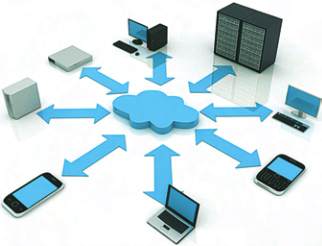
This is entirely false. A copy of your
entire digital locker is always kept
in the locker. For example: When
you create or modify a contact in
your phone - your phone realizes
that you’ve made a change to your
address book. Next, your phone
makes a connection to your cloud
account. During this connection
your phone makes updates to the
locker so that everything matches.
After the update takes place the
locker itself contacts each of your
other devices and adds the new
information to them.
The next time someone asks you
what a Cloud is you will now be
able to tell them. It’s a personal
storage unit that keeps all of your
devices in sync. This allows you to
do things once but benefit from
them over and over. In addition to
keeping all of your information in
order, Cloud accounts can also be
used to share information with oth-
ers. The useful example of this is
when a family has a single calendar
that everyone can view and add
items to on a daily basis.
MyTechGuy
offers personalized
tech support for your Home or Small
Business. Please email your ques-
tions to lou@mytechguynj.com.
WHAT IS A CLOUD?
By: Louis Brucker, My TechGuy In-Home Computer Care
The Connections NJ